A Pocket alternative that doesn't need an account.
Pocket is gone, and most of what's left wants a login, a monthly fee, or both. Stiva is a read it later app for Android that keeps your saved articles on your phone, reads them offline, and has a built-in tool to import your existing Pocket export.

No account. No servers. No subscription. Free to save, read and listen. Pay once for Premium.
What Pocket was for.
You come across a good link at lunch, with no time and no clarity to give it the attention it deserves. You save it for the evening, when everything slows down. That habit is worth keeping, even though Pocket isn't.
Near the end, Pocket started stacking trending stories on top of your own list. Stiva goes the other way. It's a quiet corner: your saved articles, whatever you already started kept in sight, and no algorithm suggesting what to read next. Nothing to sign up for, no reminder emails, your reading on your own phone.
What makes it different.
Stiva does one job, the one Pocket did before it grew a feed: it holds what you saved until you're ready to read it.
Your library stays on your device
Stiva saves the full article text locally. There's no Stiva account and no server holding your reading. Optional Google Drive or Dropbox sync is yours to switch on and yours to switch off.
No subscription
Free to save, read, listen and organize. Premium is a one-time purchase tied to a major version, not a monthly charge. More on the no-subscription model.
Offline by default
Every saved article is readable with no connection, in a distraction-free reader with light, dark and sepia themes and native text-to-speech.
Bring your Pocket library with you
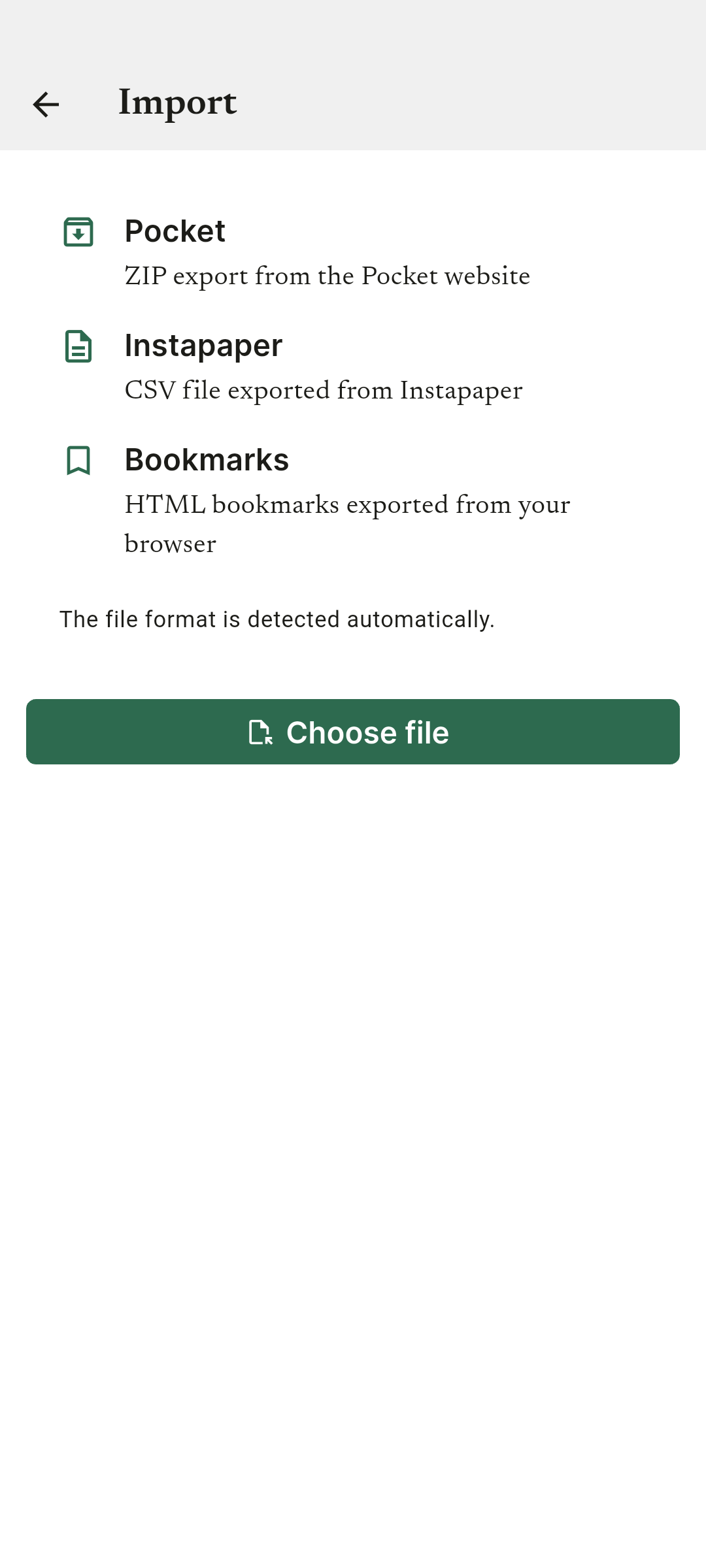
Stiva has a built-in import tool for Pocket export files, along with Instapaper and Raindrop exports, browser bookmarks, and generic ZIP, HTML and CSV files.
Stiva next to the others.
Pocket has shut down. Here's how Stiva compares to the apps people move to.
| Feature | Stiva | Instapaper | Raindrop | Readwise Reader | |
|---|---|---|---|---|---|
| Price | Free; one-time 6,99€ for Premium (eurozone price) | Discontinued (2025) | Free tier; $5.99/mo Premium | Free tier; ~$3/mo Pro (yearly) | $9.99/mo, no free tier |
| Account needed | No | — | Yes | Yes | Yes |
| Where the library lives | Your device | — | Their cloud | Their cloud | Their cloud |
| Offline reading | Yes, every article | — | Yes | Not really a reader | Selective |
| Text-to-speech | Yes, native voices (free, offline) | — | Premium | No | Yes, online only |
| Platforms | Android; iOS soon | — | iOS, Android, web | iOS, Android, web, desktop | iOS, Android, web |
| Web app | On the roadmap | — | Yes | Yes | Yes |
Competitor pricing and details are as of 2026 and change often; check each service for its current terms.
For years it was the default: clean saving, a readable view, sync across devices. Mozilla discontinued it in 2025. If you saved an export before it closed, that file is still the easiest way to move your list somewhere new.
Instapaper
Still the most familiar reader in the category, and still maintained. The catch is that the things you reach for often, full-text search, text-to-speech, unlimited notes, send to Kindle, need the paid Premium plan. Stiva's import tool reads its CSV export.
Raindrop
A generous free tier, but it's a bookmark manager before it's a reader. It's built for collecting and tagging links, not for sitting down with a long article offline. If that was the part of Pocket you cared about, it will feel thin. Stiva's import tool accepts a Raindrop export as well.
Readwise Reader
The most capable of the group: inline summaries, highlight review, strong sync to Obsidian and Notion. It's also a subscription with no free tier (a 30-day trial, then $9.99 a month billed yearly), and it makes the most sense if you already pay for Readwise. To save, read offline and keep a few highlights, it's more app than you need.
Self-hosted
Options like Wallabag run the whole thing on a server you own. That's real data ownership, at the cost of running a server. Stiva keeps the data on your phone instead, which covers most of the same ground with nothing to maintain.
Where Stiva doesn't fit
Stiva is Android only for now, with a web app on the roadmap. If your reading is split between a laptop and a phone all day, that will get in the way. Everything else here, one-tap saving, an offline reader, text-to-speech, highlights with export, it does, without an account or a subscription.
How to move your library.
Find your export file
If you saved a Pocket export before it shut down, you're set. Instapaper, Raindrop and most browsers can export a file too.
Open Stiva's import tool
In Stiva, go to Settings → Import and point it at your ZIP, HTML or CSV file.
Start reading
Your articles land in the library, ready to read offline or listen to.
How cleanly an import lands depends on how each service formats its export. Stiva keeps refining the handlers as those formats change.
Common questions.
- Is Stiva a good Pocket alternative?
- Stiva covers what most people used Pocket for: one-tap saving, a clean offline reader, text-to-speech and highlights. The trade-off is that Stiva keeps your library on your device instead of in the cloud, and it's Android-only for now, with iOS and a web app on the roadmap.
- What happened to Pocket?
- Mozilla discontinued Pocket in 2025. Data could be exported for a while afterwards. Stiva's import tool supports Pocket export files, so a saved export can still be brought in.
- Can I import my Pocket data into Stiva?
- Yes. Stiva has a built-in import tool for Pocket export files, along with Instapaper and Raindrop exports, browser bookmarks and generic ZIP, HTML and CSV files. How cleanly an import lands depends on how the source formats its export.
- Is there a read it later app without a subscription?
- Stiva is one. Saving, reading, listening and organizing your library is free. Premium features unlock with a one-time purchase per major version, never a recurring charge.
- Does Stiva work offline?
- Yes. Saved articles are stored on your phone and stay readable with no connection.
- Does Stiva have an iOS app?
- Not yet. Android is available now and an iOS version is in progress. Leave your email to be notified.
- Does Stiva have a web app?
- Not yet. Stiva is a mobile app today, and a web version is on the roadmap. The app moves forward in steady release cycles and keeps improving with each one.
Stiva is out on Android. iOS is next.
Leave your email and we'll let you know the moment the iOS version lands.
Built for saved reading, not feeds, ads or engagement loops.